

init in your project. Reticle is a verification layer for AI coding agents: it embeds a dev-only SDK in your running web app so an agent can prove a change works instead of guessing.
By the end of this page your agent will click a button in your app and prove what happened: the request that fired, the state that changed, and the file to open if it didn’t.
Every response on this page is real output, captured against a running app while writing it.
Nothing here is illustrative.
Prerequisites
- Node 20 or newer
- A web app you can run locally, and its dev server
- A coding agent that speaks MCP (Claude Code, Cursor, Codex, OpenCode, Windsurf, VS Code)
Step 1. Install it on this machine
In a terminal, before you open your coding agent:reticle on your PATH and registers the MCP server with every coding agent it can reach: Claude Code, Cursor, Windsurf, VS Code, Zed, Gemini CLI, Copilot CLI, OpenCode, Warp, Kiro, Amazon Q, Cline, Amp, Continue and Factory Droid. Nothing is asked.
Codex CLI keeps a TOML config that Reticle will not rewrite, so the installer prints the lines to paste and the file to paste them into.
Run this before opening your agent, and there is nothing to restart. A coding agent reads its
MCP server list once at startup. Install while it is closed and the tools are simply there when
you open it. If it was already open, quit and reopen it once.
Step 2. Open your coding agent, and wire the project
Thereticle_* tools are already there. In your project directory:
npm init or git init, this is the per-project step: it installs the SDK, wires it into your app’s entry point, restarts your dev server and then opens your app to prove a session connected. It is idempotent. Run it twice and the second run reports what was already done rather than doing it again.
Step 1 is once per machine. This step is once per project.
Prefer to install the skill and let the agent run setup itself? On Claude Code the plugin registers the MCP server and the skill in one step:
/reticle and the agent runs the install from the skill.
Useful flags, from reticle init itself:
--dry-run if you want to see the plan before anything is written.
Prefer to wire it yourself? See Manual install. It is about ten lines, and worth reading once even if you let the agent do it, because it explains what the agent actually changed.
Step 3. Check the setup
doctor diagnoses the whole setup in one command: Chromium, the daemon, the port. If something is wrong this is the page you want before you start debugging your app instead.
Step 4. Start your app and open it
Start your dev server as usual, then:Step 5. Look at the page
Ask your agent to take a snapshot. This is what came back from a real app:[REDACTED]. Reticle redacts credential-shaped values before they leave the page, so your agent’s context never holds your test password, let alone your real one.
The whole snapshot cost 61 tokens. This is mode: "interactive", which returns only the controls. A full accessibility-tree dump of a comparable page runs to thousands. Reticle is built to ask narrow questions, because the answer gets re-sent to the model on every turn.
Each control has a ref like e5. That’s the handle for the next step, and it stays valid until the element leaves the DOM, so you don’t re-snapshot between actions.
Step 6. Act, and prove it
Here is the whole idea of Reticle in one call. Your agent names the expected consequence before it acts: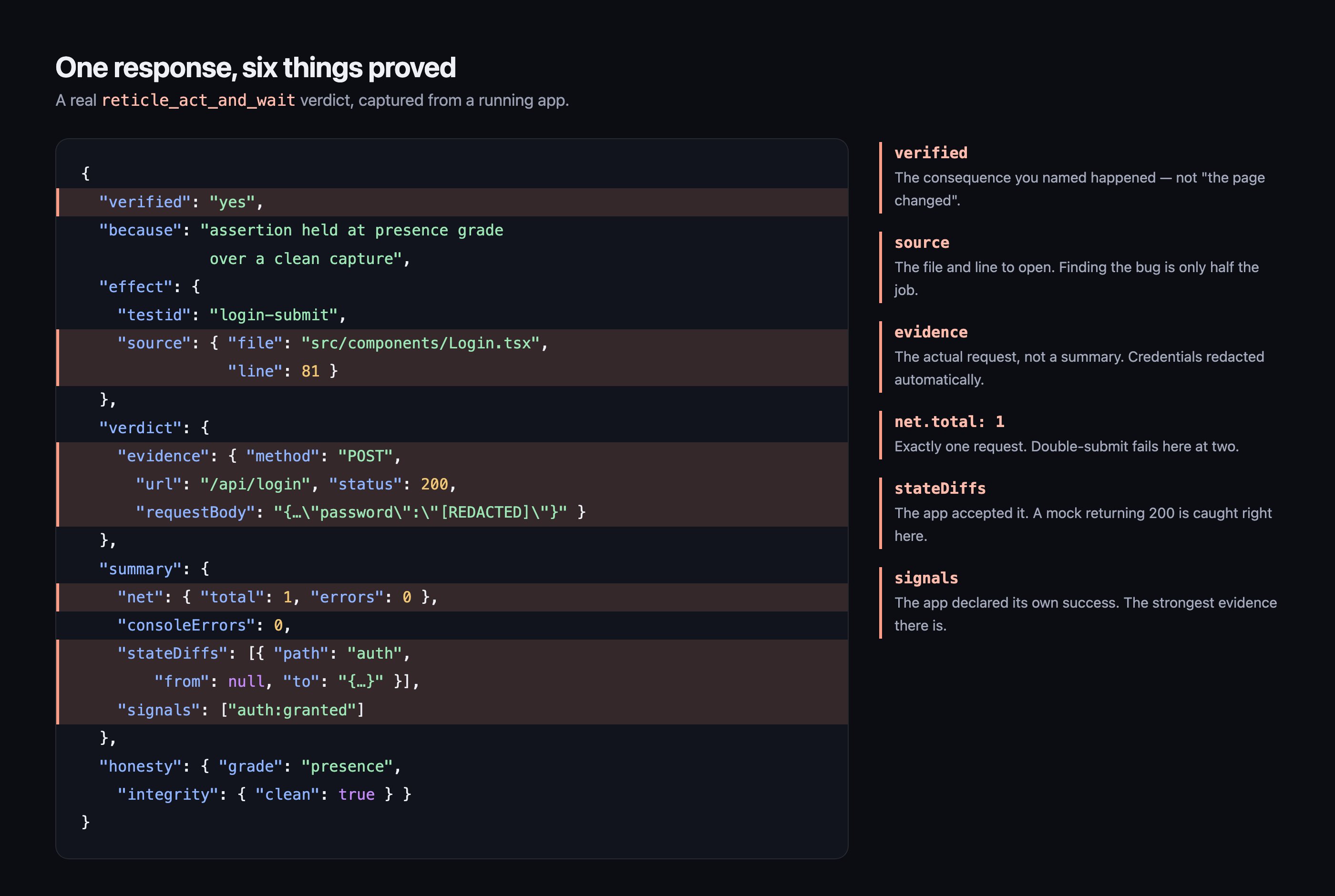
What “verified” can say
yes
The consequence you named actually happened, and the evidence is attached.
no
It did not happen. This is a finding, with the source pointer to go fix it.
unknown
Reticle drove the app and could not tell. This is not a pass. Report it as unknown.
Frequently asked questions
How long does it actually take to install Reticle?
How long does it actually take to install Reticle?
Two commands, and no restart if you run them in order. The installer registers the MCP server
with every agent on the machine, so opening your agent afterwards is all that is needed. Then
npx @reticlehq/server init wires the project and restarts your dev server for you. The MCP
registration is global, so every later project starts with the tools already there.Do I need to write tests or learn a query syntax?
Do I need to write tests or learn a query syntax?
No. You talk to your agent in plain language and it calls the tools. There is no spec file, no
selector language and no test runner involved in the loop on this page. If you later want the same
flow to block a bad merge, you can save it and run it in CI, but that is a separate step.
Will any of this end up in my production build?
Will any of this end up in my production build?
No. The SDK is dev-only. The Vite plugin declares
apply: 'serve', so it is dropped from vite build entirely, and connect() self-disables when the build reports NODE_ENV=production. The
recommended wiring also guards the call behind import.meta.env.DEV, so there are two independent
locks.Does my code or my app's data leave my machine?
Does my code or my app's data leave my machine?
No. The daemon runs on your machine and the SDK runs in your browser. No application code, DOM,
network traffic or console output leaves it. Anonymous product analytics are sent unless you opt
out with
npx @reticlehq/server telemetry disable, and they never include your code or your app’s
data.What if my framework is not React or Next.js?
What if my framework is not React or Next.js?
The core is framework-neutral, so DOM, network, console, routing and source mapping work anywhere
JavaScript runs. What varies is how
connect() gets into your app and whether you get component
identity on top. See Frameworks for the exact wiring per stack and an honest table
of what is gated in CI versus wired but unverified.Nothing connected. What is the first thing to check?
Nothing connected. What is the first thing to check?
Run
npx @reticlehq/server doctor. If it shows the daemon running but sessions at zero, your
app is not reaching the bridge, and the usual cause is a port mismatch. The bridge port is not
your dev-server port. See Troubleshooting.Where to go next
Instrument your app
Emit signals like
auth:granted so your verdicts get stronger than “the DOM changed”.Every tool
The 18 tools your agent sees by default, and the 30 more it can reach on demand.
Run it in CI
Turn this session into a suite that blocks a bad merge.
Why Reticle
The false-green problem, and the measured case that this fixes it.