

How you actually test a desktop app
The usual question is “it’s a desktop app, so what URL does the agent open?”. There isn’t one, and that is the whole problem. The direction is reversed from what browser tooling trains you to expect: Your app connects to the daemon, not the other way round. So the workflow is:-
Start the daemon once.
-
Start your app exactly as you always do.
-
Confirm it connected.
Your window appears as a session, and the agent can drive it.
reticle open has nothing to open for a desktop app and will say so, and there is no reticle drive for desktop: those launch a browser, which is not what you are testing. Headless works on both runtimes, covered below.
The thing nobody else does
A desktop app’s most interesting failures happen at the IPC boundary. The renderer asks the main process for something, and the main process quietly fails. The renderer cannot see that. A screenshot certainly cannot. Reticle records it as a request: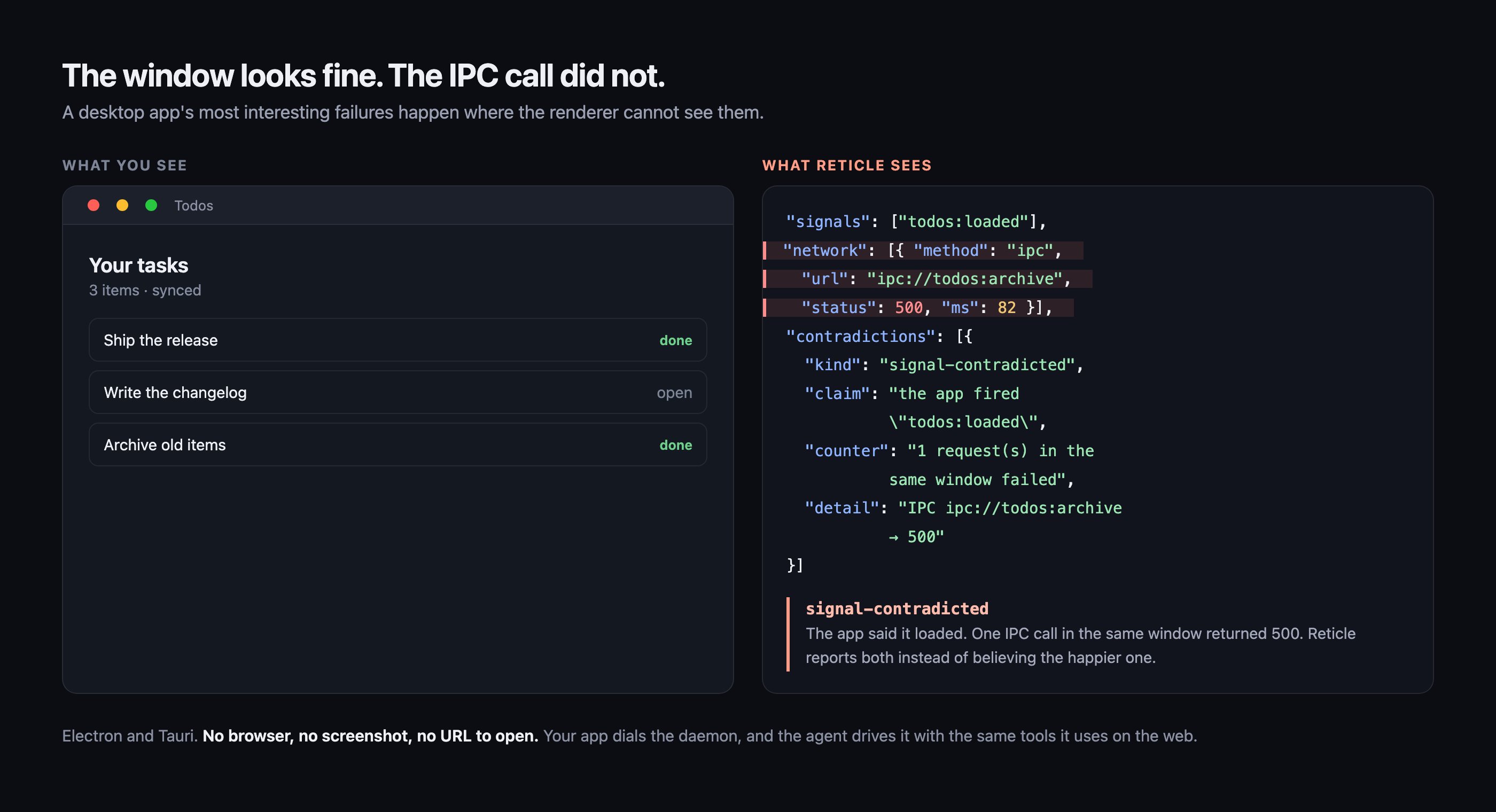
The window on the left is an illustration. The JSON on the right is real output from the desktop
battery, which starts a real Electron main process and a packaged Tauri binary and drives them
headless on every change.
What works, measured
Every tool below was run against both demo apps against a live daemon. The rows in bold are re-proven by a committed battery on every change,pnpm test:e2e:desktop, which starts a real Electron main process and a packaged Tauri binary (tauri://localhost, not tauri dev) and drives them headless. The rest were measured by hand. That distinction matters: this table used to report a hand-run score with nothing in the repo that reproduced it, so it could go stale without anything failing.
Three things that are genuinely different
It works occluded
Minimized, app-hidden, behind a fullscreen app on another Space. The agent keeps driving.
Screenshots cannot lie
Captured from the window’s own backing store, never the screen.
Missing wiring is declared
Electron without the preload reports
coverage: partial, not a clean pass.Electron setup
Two steps. The first is the ordinary web setup; the second is the only desktop-specific part. 1. The renderer. One line invite.config.ts, exactly like a web app:
desktop: true does the two things a desktop shell needs and a web app must never get: the plugin also runs for vite build (a packaged renderer is a production build with no dev server, so the default serve-only gating would ship an app with no connect() at all), and connect() is called with allowInProduction so the SDK’s production backstop does not refuse to start. Keep it behind your own dev-only build so an instrumented bundle can never reach a release binary.
Nothing to add in your app code. You can still call reticle.connect() by hand and pass inject: false if you want control.
2. The preload. One line, before you expose anything:
contextBridge.exposeInMainWorld hands the renderer a deeply frozen, non-configurable object, so nothing running in the page can instrument window.api. The preload is the last point where ipcRenderer.invoke is still an ordinary, writable function. Patching there covers every channel you go on to expose, whatever you named it.
Preload sandboxing. A sandboxed preload cannot resolve node_modules, so the bare require above fails with module not found: @reticlehq/electron/preload. Either bundle your preload (electron-vite and Electron Forge do this by default; the require is inlined at build time and sandboxing stays on), or set sandbox: false in webPreferences.
Packaged renderers. An app that loads its renderer with loadFile runs on file://, which is a production Vite build. Pass allowInProduction: true to connect() for that mode, or keep the SDK gated behind import.meta.env.DEV so it never enters the shipped binary at all.
Working example: apps/electron-smoke.
Tauri setup
Frontend side, nothing desktop-specific:invoke travels as a real fetch to Tauri’s ipc:// custom protocol, so Reticle already sees it; every invoke('load_todos') shows up as ipc://load_todos. Reticle also reads Tauri’s Tauri-Response header, because the transport answers HTTP 200 whether the Rust command returned Ok or Err. Without that translation a failed command would be recorded as a successful request.
The one required step is CSP. Tauri ships a restrictive default that blocks the bridge WebSocket before it opens, and the failure is silent from the app’s side. In src-tauri/tauri.conf.json:
apps/tauri-smoke.
Screenshots
Electron: one line in the main process.file:// renderer. reticle_screenshot and reticle_visual_diff then work on your app.
Alternatively, since an Electron renderer is Chromium, --remote-debugging-port=9222 plus RETICLE_CDP_URL=http://127.0.0.1:9222 also works and additionally enables fullPage (the main-process route captures the window as composited, so it cannot scroll-stitch).
Tauri: one Rust command. The crate is versioned independently of the npm packages:
Why the backing store, and not a screen capture
webContents.capturePage() reads the window’s own backing store. Capturing a screen region instead was tried and deliberately rejected: it photographs whatever is on top, so an app window behind your editor yields a picture of the editor, saved as a visual baseline that a later diff would trust. A screenshot tool that can silently return another window’s pixels manufactures exactly the false green Reticle exists to eliminate.
reticle_capture on Tauri renders the webview for the same reason, so it needs no screen-recording permission, cannot return another window’s pixels, and is correct with nothing on screen at all. Each platform uses its own webview API:
The Windows path is written and type-checked against the real
webview2-com API (which caught two genuine type errors), but nobody has run it on Windows. CI re-checks it against that target on every PR (cargo check --target x86_64-pc-windows-msvc), so “compiles” is a gate rather than a claim. Executed is still a different word from compiled: it is shipped rather than withheld so it can be tried, and labelled rather than listed flatly so that trying it is a choice. If it works for you, say so and this row changes; treat a green from it as unconfirmed until then.
All three capture the visible viewport by default, so a baseline taken on a developer’s Mac is comparable against the same app in Linux CI. On a platform with no webview API to call, capture reports no-provider rather than returning a plausible wrong image.
{ fullPage: true } works on Tauri/Linux only. WebKitGTK can render the whole document offscreen; takeSnapshot (macOS) and CapturePreview (Windows) only give what is composited, and Electron’s capturePage() is the same. Asked for a full page they cannot produce, all of them return { ok: false, reason: 'full-page-unsupported' } rather than quietly handing back the viewport, which would be a baseline that omits everything below the fold while every later diff of it reports green about a region that was never captured. No baseline is written on a refusal.
An app that already has its own capture can expose window.__reticleIpc.capture() returning a PNG path instead; the SDK prefers it over the built-in command.
Headless
Electron: yes.show: false plus backgroundThrottling: false in webPreferences. The second one is load-bearing: Chromium runs an unshown window’s timers in slow motion, which turns every settle wait into a flake. Screenshots still work, because capturePage reads the backing store rather than the screen. Verified with a full tool drive against a window that was never shown.
Tauri: yes. Show, load, then hide.
RETICLE_HEADLESS=1 pnpm tauri dev. Nothing ends up on screen, and screenshots keep working because the capture renders the webview rather than the screen.
The ordering is the whole trick. Hiding the window during setup hides it before the webview has ever been presented, and a webview that has never been presented never loads its page, which is what made headless Tauri look impossible. Hiding it after its first page load leaves everything running. Verified with a full 43-tool drive plus a screenshot and a visual diff against a window that is not on screen.
xvfb-run -a pnpm tauri dev also works on Linux and needs no app-side change at all.
A correction worth recording: the Tauri macOS “liveness constraint” was wrong
Earlier versions of this document said a Tauri app on macOS is only drivable while its window is on the active Space and unoccluded, and that hiding it suspends the webview. That is not true, and the mistake is worth recording because it cost three features. Re-measured against the live app, a loaded Tauri webview answers Reticle commands at full speed while minimized, app-hidden with Cmd-H, fully occluded, on another Space behind a fullscreen app, and with no window on screen at all. A full 43-tool drive passes in every one of those states. What actually failed was narrower: a webview that has never been presented never loads its page. Every “suspension” experiment hid or moved the window fromsetup, meaning before the first present, so the page never ran and every command timed out at 8s. The timeouts were real; the diagnosis was not. The alwaysOnTop workaround was then built to fix a problem that did not exist, measured as “still broken” for the same reason, and deleted.
The lesson generalises past this document: four experiments agreeing does not make a conclusion controlled, if all four share the same confound.
Routing: use a hash router
A packaged renderer runs onfile://, where pushState('/settings') rewrites the URL to file:///settings, a path that does not exist, so the next reload lands on a blank page and the app is gone. This is why HashRouter is the standard choice for packaged Electron and Tauri apps. Reticle’s route observer handles both, and a { kind: 'route', contains: ... } assertion matches the fragment.
What IPC looks like to an agent
A desktop app reaches its backend over IPC, not HTTP.fetch/XHR patching cannot see that, so without the IPC observer every backend call in your app is a blind spot: reticle_network returns nothing, act_and_wait has no in-flight request to settle on, and assert { net } is vacuously true. That is a false green by construction.
Reticle records each IPC call as an ordinary request, so the tools you already use work unchanged:
200/500 are synthetic, mapped from whether the call succeeded or failed, precisely so that reticle_network { status: 500 } and assert { kind: "net", status: 500 } keep working. On Tauri you will see status: 500 next to statusText: "OK". That is not a bug: the transport really did answer 200, and the 500 is the command’s own verdict. ok is authoritative, and on Electron error carries the message your main process returned:
Why a missing preload is not a silent pass
Without@reticlehq/electron/preload, every IPC call is invisible to Reticle. A tool that just reported clean there would be telling you the IPC layer is fine when it never looked. Instead verdicts carry coverage: partial and name the missing line.
How it compares to Playwright MCP
Both attached to the same running Electron app, same task (“archive a todo, then verify it worked”):
Playwright MCP is faster. It is also structurally unable to see an IPC failure, because its channel is the accessibility tree.
Troubleshooting
reticle status shows no session. Check the app’s console. On Electron open devtools, or forward console-message to your terminal, since a desktop renderer has no visible console otherwise. A refused connect always logs why.
Tauri: nothing connects and the app console shows a CSP violation. The connect-src above is missing, or does not include your daemon’s port. See Tauri setup.
Electron: module not found: @reticlehq/electron/preload. The preload is sandboxed. Bundle it, or set sandbox: false. See Electron setup.
IPC calls do not appear, but the app works. On Electron the shim’s require must run before your preload captures its own reference to ipcRenderer, so put it on the first line. On Tauri, invoke imported from @tauri-apps/api/core is observed; a hand-rolled postMessage protocol is not, and neither is Tauri’s postMessage transport fallback on platforms where the ipc:// custom protocol is unavailable.
reticle open says there is nothing to open. That is correct for a desktop app. There is no URL, and there is no reticle drive for desktop either. Both launch a browser, which is not what you are testing.
A screenshot came back partly blank. The window is occluded or minimized, so it is only partially composited. Bring it forward and capture again.
{ ok: false, reason: 'full-page-unsupported' }. You asked for fullPage: true on a platform that cannot render offscreen. Only Tauri on Linux (WebKitGTK) can. Capture the viewport instead, or scroll and capture in sections.
FAQ
Do I need a browser installed to verify a desktop app?
Do I need a browser installed to verify a desktop app?
No. Reticle never launches Chromium for a desktop app. Your app connects to the local daemon,
and the agent drives that connection.
Does my app have to be visible on screen?
Does my app have to be visible on screen?
No. A loaded window is drivable while minimized, app-hidden, occluded, or on another Space. The
one requirement is that the window was presented at least once, because a webview that has never
been presented never loads its page.
Can Playwright do this instead?
Can Playwright do this instead?
For Electron, partly: it attaches over CDP and sees the accessibility tree, but not IPC. For
Tauri, no: WKWebView exposes no CDP endpoint, so Playwright cannot attach at all.
Does the SDK end up in my shipped binary?
Does the SDK end up in my shipped binary?
Only if you put it there. Keep the plugin behind a dev-only build, or gate
connect() on
import.meta.env.DEV. desktop: true exists because a packaged renderer is a production build,
so it opts that one build into instrumentation deliberately.Why does a Tauri response show status 500 with statusText OK?
Why does a Tauri response show status 500 with statusText OK?
The IPC transport really did answer HTTP 200. The 500 is Reticle translating the Rust command’s
own
Err result so that status: 500 filters and assertions keep working. ok is
authoritative.Electron package
@reticlehq/electron: the preload shim and the main-process capture.Tauri package
reticle-tauri: the Rust crate for capture and headless mode.