> ## Documentation Index
> Fetch the complete documentation index at: https://docs.reticle.sh/llms.txt
> Use this file to discover all available pages before exploring further.
> ## Agent Instructions
> Reticle is a dev-only, localhost-only verification layer for AI coding agents. It reads program truth (network, state, console, routing, animations, framework state) from inside a running web app and returns a deterministic verdict with evidence. It is not a screenshot tool and not a browser automation library.
> Only `reticle_act_and_wait` and `reticle_assert` produce a verdict. Every other tool moves or reads the app and proves nothing. A drive that ends without one of those two has no result, however many tools it used.
> A verdict of `verified: "unknown"` is not a pass. It means Reticle drove the app and could not tell what happened. Report it as unknown; never weaken a check to make it pass.
> Package names are scoped `@reticlehq/*` and the CLI is `reticle`. Install with `npx reticle init`. The complete tool surface is on the `/usage` page; `/agent-cheatsheet` is the one-screen version.
# Desktop apps
> Reticle verifies Electron and Tauri apps from inside, including the IPC boundary the renderer cannot see. No browser, no screenshot, no URL to open.
Ask most browser tooling to test a desktop app and the first question is "what URL do I open?".
There isn't one. That is the whole problem, and it is why desktop verification is mostly unserved.
Reticle inverts the direction. Your app dials the local daemon, the agent drives it through the same tools it uses for the web, and the verdicts read the same. No Chromium to launch, no screenshot to interpret.
## The thing nobody else does
A desktop app's most interesting failures happen at the **IPC boundary**. The renderer asks the main process for something, and the main process quietly fails.
The renderer cannot see that. A screenshot certainly cannot. Reticle records it as a request:
```json theme={"dark"}
{ "method": "ipc", "url": "ipc://todos:archive", "status": 500, "ms": 82 }
```
Then it contradicts a UI that moved on regardless:
```json theme={"dark"}
{
"kind": "signal-contradicted",
"claim": "the app fired \"todos:loaded\"",
"counter": "1 request(s) in the same window failed",
"detail": "IPC ipc://todos:archive → 500"
}
```
The app said it loaded. One IPC call in the same window returned 500. Reticle puts both in front of the agent instead of believing the happier one.
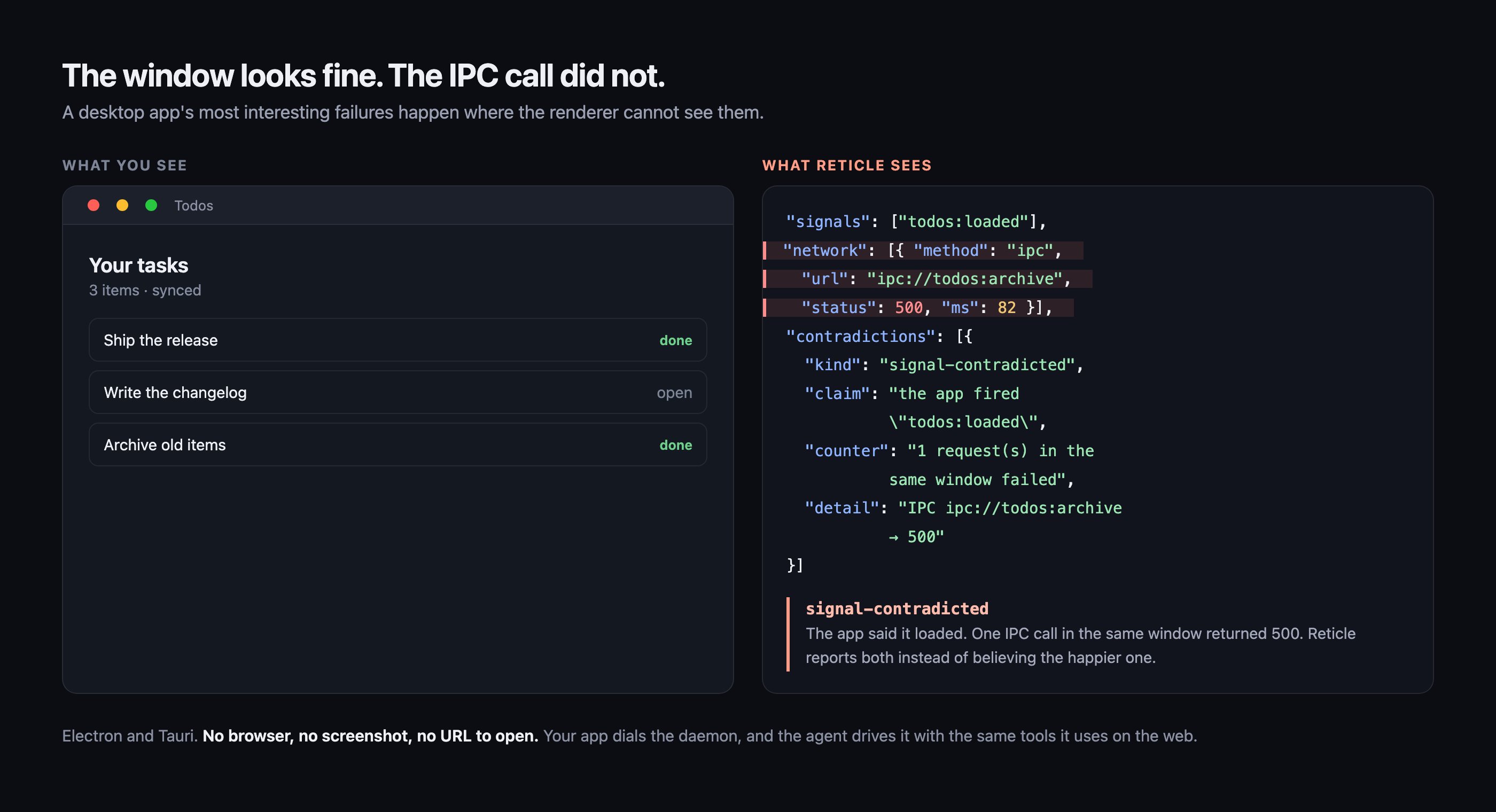 The window on the left is an illustration. The JSON on the right is real output from the desktop
battery, which starts a real Electron main process and a **packaged** Tauri binary and drives them
headless on every change.
## What works, and what is proven
| Capability | Electron | Tauri |
| --------------------------------------------- | :------: | :---: |
| sessions, snapshot, query, inspect | yes | yes |
| capabilities, live store state | yes | yes |
| act: click, fill, type, select | yes | yes |
| **act\_and\_wait, wait\_for, assert** | yes | yes |
| console errors | yes | yes |
| network over HTTP | yes | yes |
| **network over IPC** | yes | yes |
| route (use a hash router) | yes | yes |
| storage, animations, observe, explore | yes | yes |
| baselines, record and replay, crawl | yes | yes |
| **screenshot and visual diff** | yes | yes |
| **drivable while occluded or minimized** | yes | yes |
| **headless** | yes | yes |
| **a missing preload is declared, not silent** | yes | n/a |
| network mocking, viewport pinning | no | no |
Bold rows are re-proven by `pnpm test:e2e:desktop` on every change. The rest were measured by hand.
That distinction is deliberate. This table used to report a hand-run score with nothing in the repo reproducing it, so it could go stale without anything failing.
## Three things that are genuinely different
Minimized, app-hidden, behind a fullscreen app on another Space. The agent keeps driving.
Captured from the window's own backing store, never the screen.
Electron without the preload reports `coverage: partial`, not a clean pass.
### Why screenshots read the backing store
`webContents.capturePage()` reads the window's own pixels. Capturing a screen *region* was tried and deliberately rejected.
A region capture photographs whatever is on top. An app window behind your editor yields a picture of the editor, saved as a visual baseline that a later diff would trust.
A screenshot tool that can silently return another window's pixels manufactures exactly the false green Reticle exists to eliminate.
One honest caveat. A fully occluded or minimized window is only partially composited, so parts of
a capture may come back blank. Bring the window forward for a complete image. It is never the
wrong window.
### Why a missing preload is not a silent pass
Without `@reticlehq/electron/preload`, every IPC call is invisible to Reticle.
A tool that just reported clean there would be telling you the IPC layer is fine when it never looked. Instead verdicts carry `coverage: partial` and name the missing line.
## Getting started
The workflow has no browser step in it at all.
1. **Start the daemon once.**
```bash theme={"dark"}
npx @reticlehq/server serve
```
2. **Start your app exactly as you always do.**
```bash theme={"dark"}
npm run dev # or: electron . | cargo tauri dev
```
3. **Confirm it connected.**
```bash theme={"dark"}
npx reticle status
```
Your window appears as a session, and the agent can drive it.
### Electron
Screenshots are one line in the main process:
```js theme={"dark"}
const { installReticleCapture } = require('@reticlehq/electron/main');
const win = new BrowserWindow({
/* … */
});
installReticleCapture(win);
```
No CDP flag, no extra packages, and it works on a packaged `file://` renderer.
### Tauri
The frontend is identical to any web app. The CSP is not optional:
```json theme={"dark"}
{
"app": {
"security": {
"csp": "default-src 'self' ipc: http://ipc.localhost; connect-src 'self' ipc: http://ipc.localhost ws://localhost:4400 ws://127.0.0.1:4400"
}
}
}
```
Tauri's default CSP blocks the bridge WebSocket **before it opens**. Your app runs perfectly and
simply never connects, with no error to go on.
Keep `ipc: http://ipc.localhost` in `connect-src`, because Tauri v2 needs it for `invoke` itself. Drop the `ws://` entries from your release config.
IPC observation needs nothing on the Rust side. An `invoke('load_todos')` already reaches Reticle as `ipc://load_todos`.
Screenshots and headless mode need the crate, which is versioned independently of the npm packages:
```toml theme={"dark"}
[dependencies]
reticle-tauri = "0.1"
```
```rust theme={"dark"}
tauri::Builder::default()
.invoke_handler(tauri::generate_handler![reticle_tauri::reticle_capture])
.on_page_load(reticle_tauri::on_page_load)
```
## Keep reading
Every capability in detail, what IPC looks like to an agent, and desktop troubleshooting.
The wiring for both runtimes, step by step.
The window on the left is an illustration. The JSON on the right is real output from the desktop
battery, which starts a real Electron main process and a **packaged** Tauri binary and drives them
headless on every change.
## What works, and what is proven
| Capability | Electron | Tauri |
| --------------------------------------------- | :------: | :---: |
| sessions, snapshot, query, inspect | yes | yes |
| capabilities, live store state | yes | yes |
| act: click, fill, type, select | yes | yes |
| **act\_and\_wait, wait\_for, assert** | yes | yes |
| console errors | yes | yes |
| network over HTTP | yes | yes |
| **network over IPC** | yes | yes |
| route (use a hash router) | yes | yes |
| storage, animations, observe, explore | yes | yes |
| baselines, record and replay, crawl | yes | yes |
| **screenshot and visual diff** | yes | yes |
| **drivable while occluded or minimized** | yes | yes |
| **headless** | yes | yes |
| **a missing preload is declared, not silent** | yes | n/a |
| network mocking, viewport pinning | no | no |
Bold rows are re-proven by `pnpm test:e2e:desktop` on every change. The rest were measured by hand.
That distinction is deliberate. This table used to report a hand-run score with nothing in the repo reproducing it, so it could go stale without anything failing.
## Three things that are genuinely different
Minimized, app-hidden, behind a fullscreen app on another Space. The agent keeps driving.
Captured from the window's own backing store, never the screen.
Electron without the preload reports `coverage: partial`, not a clean pass.
### Why screenshots read the backing store
`webContents.capturePage()` reads the window's own pixels. Capturing a screen *region* was tried and deliberately rejected.
A region capture photographs whatever is on top. An app window behind your editor yields a picture of the editor, saved as a visual baseline that a later diff would trust.
A screenshot tool that can silently return another window's pixels manufactures exactly the false green Reticle exists to eliminate.
One honest caveat. A fully occluded or minimized window is only partially composited, so parts of
a capture may come back blank. Bring the window forward for a complete image. It is never the
wrong window.
### Why a missing preload is not a silent pass
Without `@reticlehq/electron/preload`, every IPC call is invisible to Reticle.
A tool that just reported clean there would be telling you the IPC layer is fine when it never looked. Instead verdicts carry `coverage: partial` and name the missing line.
## Getting started
The workflow has no browser step in it at all.
1. **Start the daemon once.**
```bash theme={"dark"}
npx @reticlehq/server serve
```
2. **Start your app exactly as you always do.**
```bash theme={"dark"}
npm run dev # or: electron . | cargo tauri dev
```
3. **Confirm it connected.**
```bash theme={"dark"}
npx reticle status
```
Your window appears as a session, and the agent can drive it.
### Electron
Screenshots are one line in the main process:
```js theme={"dark"}
const { installReticleCapture } = require('@reticlehq/electron/main');
const win = new BrowserWindow({
/* … */
});
installReticleCapture(win);
```
No CDP flag, no extra packages, and it works on a packaged `file://` renderer.
### Tauri
The frontend is identical to any web app. The CSP is not optional:
```json theme={"dark"}
{
"app": {
"security": {
"csp": "default-src 'self' ipc: http://ipc.localhost; connect-src 'self' ipc: http://ipc.localhost ws://localhost:4400 ws://127.0.0.1:4400"
}
}
}
```
Tauri's default CSP blocks the bridge WebSocket **before it opens**. Your app runs perfectly and
simply never connects, with no error to go on.
Keep `ipc: http://ipc.localhost` in `connect-src`, because Tauri v2 needs it for `invoke` itself. Drop the `ws://` entries from your release config.
IPC observation needs nothing on the Rust side. An `invoke('load_todos')` already reaches Reticle as `ipc://load_todos`.
Screenshots and headless mode need the crate, which is versioned independently of the npm packages:
```toml theme={"dark"}
[dependencies]
reticle-tauri = "0.1"
```
```rust theme={"dark"}
tauri::Builder::default()
.invoke_handler(tauri::generate_handler![reticle_tauri::reticle_capture])
.on_page_load(reticle_tauri::on_page_load)
```
## Keep reading
Every capability in detail, what IPC looks like to an agent, and desktop troubleshooting.
The wiring for both runtimes, step by step.